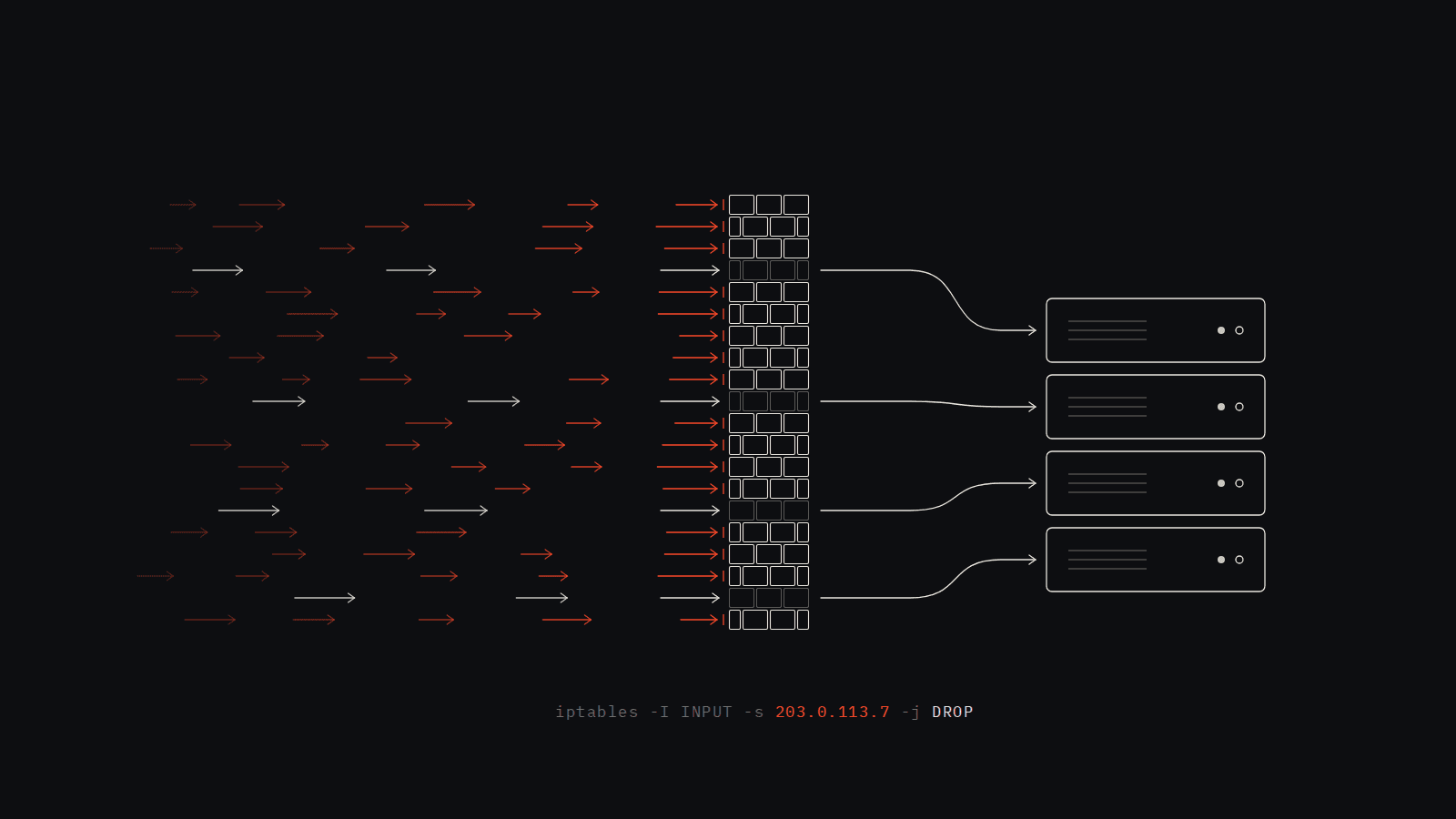
A few months ago I got obsessed with a question: what would it actually take to build your own DDoS detection system from scratch — no Cloudflare, no Fail2Ban, no magic third-party library — just you, Python, and the Linux kernel?
I decided to find out. The result is a daemon that runs continuously alongside a web server, watches every incoming HTTP request, learns what normal traffic looks like, and automatically drops attackers at the firewall level within seconds of detection. It sends Slack alerts, unbans IPs on a progressive schedule, and serves a live metrics dashboard.
This post is the guide I wish I had when I started. I'll explain every concept from first principles, show you the actual code with file references, and walk you through putting it all together. If you've never touched security tooling before, that's fine — I'll explain the math too.
What Problem Are We Actually Solving?
When you run a public web server, you're exposed. At any moment, someone can point a bot army at your IP and flood you with thousands of requests per second. Your server spends all its resources responding to garbage traffic. Real users time out. Your app goes down.
The standard advice is "use Cloudflare" or "use Fail2Ban." But those are black boxes. I wanted to understand the actual mechanics — how do you decide what's an attack and what's just a busy afternoon? How do you avoid banning legitimate users? How does the firewall actually drop packets?
The answer turns out to be statistics. Not machine learning, not signatures, not pattern matching — just a rolling mean, a standard deviation, and a z-score. Once I understood that, everything else was just plumbing.
Architecture
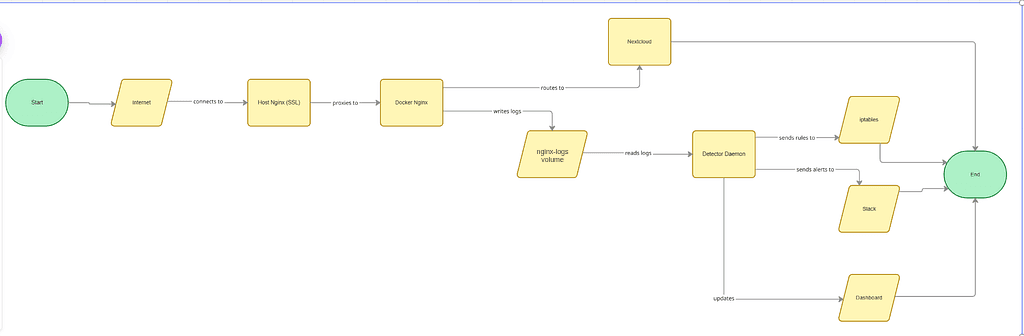
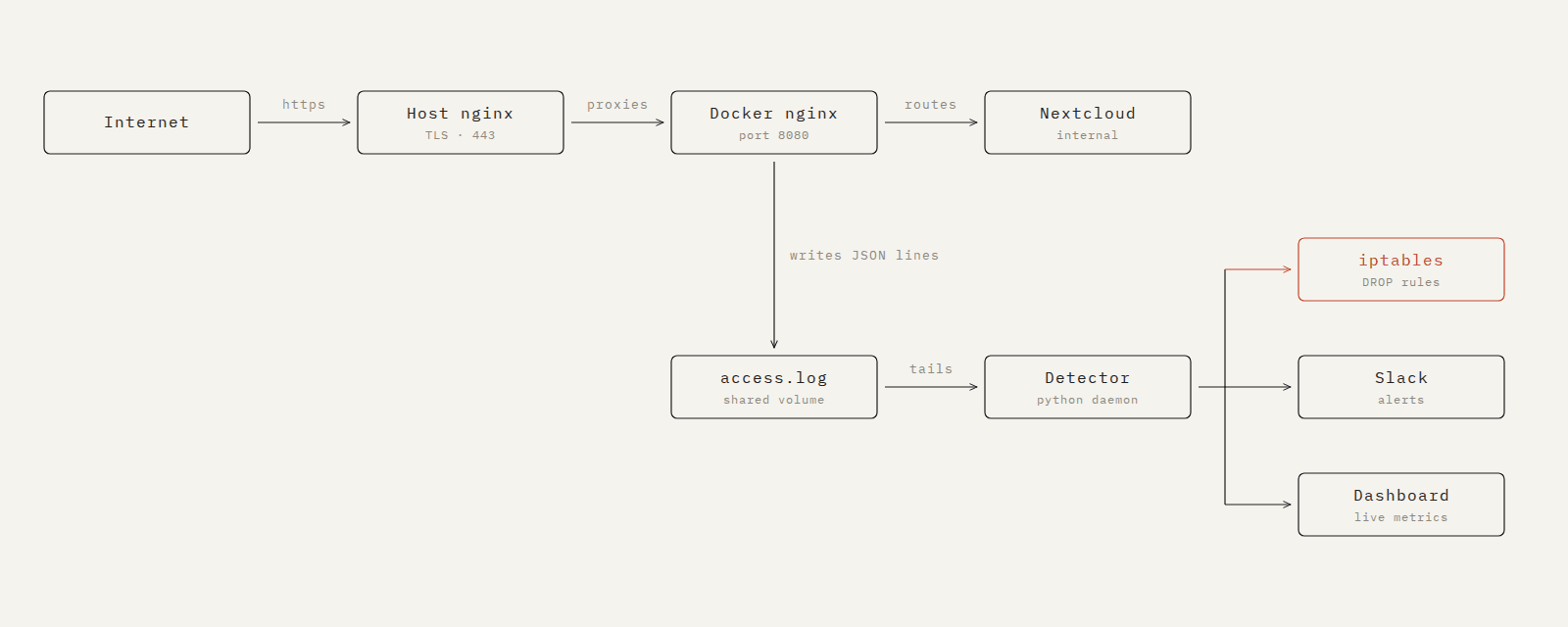
Before writing a single line of code, it helps to see how the pieces fit together:
Internet
    │
    ▼
Host Nginx (SSL/443)
    │  proxies to
    ▼
Docker Nginx (port 8080) ──── writes JSON logs ────▶ /var/log/nginx/access.log
    │                                                         │ (shared Docker volume)
    ▼                                                         │
Nextcloud (port 80, internal)                                 ▼
                                                    Detector Daemon (Python)
                                                         │          │
                                                         ▼          ▼
                                                    iptables    Slack + Dashboard
The key insight in this design: Nginx and the detector never talk to each other directly. Nginx writes to a log file. The detector reads that log file. They're completely decoupled — you could swap either one out without touching the other.
Project Structure
Here's the full folder layout before we build anything:
project/
├── docker-compose.yml          # Spins up everything together
├── .env                        # Secrets and config (never commit this)
├── nginx/
│   └── nginx.conf              # JSON logging + reverse proxy config
├── detector/
│   ├── Dockerfile              # How to containerise the detector
│   ├── requirements.txt        # Python dependencies
│   ├── config.yaml             # All tunable thresholds in one place
│   ├── main.py                 # Entry point — wires all modules together
│   ├── monitor.py              # Tails and parses the Nginx access log
│   ├── baseline.py             # Rolling 30-min baseline (mean + stddev)
│   ├── detector.py             # Z-score and rate-multiplier anomaly checks
│   ├── blocker.py              # iptables DROP rule management
│   ├── unbanner.py             # Progressive backoff auto-unban scheduler
│   ├── notifier.py             # Slack webhook alerts
│   ├── dashboard.py            # Flask live metrics dashboard
│   └── audit.py                # Structured event log (ban/unban/recalc)
└── README.md
One rule I followed throughout: every tunable number lives in config.yaml. Not hardcoded in the Python files. This makes it easy to adjust thresholds without touching logic code.
Step 1: Getting Nginx to Write JSON Logs
The detector can only work if it has structured data to read. Nginx's default log format is a human-readable string — great for reading, terrible for parsing in code. The first thing to do is switch it to JSON.
# nginx/nginx.conf
# Define a JSON log format. escape=json handles special characters safely.
log_format json_log escape=json
    '{'
        '"timestamp":"$time_iso8601",'
        '"source_ip":"$remote_addr",'
        '"x_forwarded_for":"$http_x_forwarded_for",'
        '"method":"$request_method",'
        '"path":"$request_uri",'
        '"status":$status,'
        '"response_size":$body_bytes_sent,'
        '"request_time":$request_time'
    '}';

# Write to the shared volume. buffer=4k flush=1s means lines hit disk within 1 second.
access_log /var/log/nginx/access.log json_log buffer=4k flush=1s;
The flush=1s part is important. Without it, Nginx buffers log lines in memory and writes them in batches. Your detector could be sitting there waiting while an attack is already underway.
Now each log line looks like this — one clean JSON object per request:
{"timestamp":"2025-04-26T10:00:01+00:00","source_ip":"1.2.3.4","method":"GET","path":"/","status":200,"response_size":1234}
Step 2: The Log Monitor — Reading Lines as They Arrive
monitor.py does one job: behave like tail -f in Python. It keeps the log file open and calls a callback function every time Nginx writes a new line.
# detector/monitor.py — tail_log()
def tail_log(log_file: str, callback) -> None:
    # Wait for the file to exist — nginx might take a few seconds to create it
    while not os.path.exists(log_file):
        time.sleep(1)

    with open(log_file, 'r') as f:
        # seek(0, 2) = move to 0 bytes from the END of the file.
        # This skips all historical entries — we only want new traffic.
        f.seek(0, 2)

        while True:
            line = f.readline()

            if not line:
                # No new data yet. Sleep 50ms to avoid burning CPU in a busy loop.
                time.sleep(0.05)
                continue

            try:
                entry = json.loads(line.strip())
                callback(entry)  # hand the parsed dict to main.py
            except json.JSONDecodeError:
                pass  # skip malformed lines (e.g. partial writes during log rotation)
The callback is process_log_entry from main.py — we'll get there. The key design decision here is that the monitor is dumb: it just parses and hands off. All the logic lives elsewhere.
Step 3: The Baseline — Teaching the System What "Normal" Means
This is the most important part of the whole system, and the part most people would get wrong by hardcoding a number.
The problem with hardcoding: a threshold of "100 req/s = attack" is useless. For a busy e-commerce site, 100 req/s is a quiet Tuesday. For a personal server at 3am, it's definitely an attack. The threshold needs to reflect actual recent traffic, not someone's guess.
The solution: a rolling 30-minute window of per-second request counts, from which we compute a live mean and standard deviation.
# detector/baseline.py — the core data structure
# maxlen=1800 means the deque holds at most 1800 entries (30 min × 60 sec).
# When it's full and you append, the oldest entry automatically falls off the left.
self.counts_window = deque(maxlen=1800)
Every second, we flush the current second's request count into this window:
# baseline.py — _flush_second()
def _flush_second(self, second, count, errors):
    self.counts_window.append(count)

    # Also store in the current hour's slot
    hour = time.localtime(second).tm_hour
    if hour not in self.hourly_slots:
        self.hourly_slots[hour] = deque(maxlen=3600)
    self.hourly_slots[hour].append(count)
Every 60 seconds, a background thread wakes up and recomputes the baseline:
# detector/baseline.py — _recalculate()
def _recalculate(self):
    current_hour = time.localtime().tm_hour
    hour_data = self.hourly_slots.get(current_hour, deque())

    # Prefer the current hour's data if we have at least 5 minutes of it.
    # This stops a quiet 3am baseline from contaminating a busy 4am detection window.
    if len(hour_data) >= 300:
        data = list(hour_data)
    else:
        data = list(self.counts_window)  # fall back to full 30-min window

    if len(data) < 2:
        return  # not enough data yet

    mean   = statistics.mean(data)
    stddev = statistics.pstdev(data)

    # Apply floor values to prevent division by zero at low traffic periods
    self.effective_mean   = max(mean,   1.0)
    self.effective_stddev = max(stddev, 0.1)
The hourly_slots dict is the clever bit. Traffic at midnight looks nothing like traffic at noon. Without it, the 30-minute window would mix data from both hours at the boundary and produce a baseline that doesn't represent either. By keeping separate buckets per hour, once the current hour has 5 minutes of data, we use it exclusively.
Step 4: The Sliding Window — Measuring Current Rate
The baseline tells us what normal looks like. Now we need to measure what right now looks like.
For every IP address, we maintain a deque of timestamps — one per request. This is the sliding window.
# detector/detector.py — data structures
from collections import deque, defaultdict

# Each IP gets its own deque of timestamps
self._ip_windows     = defaultdict(deque)
self._ip_err_windows = defaultdict(deque)  # only 4xx/5xx timestamps

# One global window across all IPs
self._global_window  = deque()
Every time a request comes in, we append the timestamp and evict anything older than 60 seconds:
# detector/detector.py — record()
now       = time.time()
ip_cutoff = now - 60  # our 60-second window

# Add the new timestamp
self._ip_windows[ip].append(now)

# Evict old ones from the left (oldest end of the deque)
while self._ip_windows[ip] and self._ip_windows[ip][0] < ip_cutoff:
    self._ip_windows[ip].popleft()

# Rate = how many timestamps remain / window length
ip_rate = len(self._ip_windows[ip]) / 60
Why deque and not a list?
list.pop(0) is O(n) — it has to shift every element left by one. If you have 10,000 entries during an attack, that's 10,000 memory operations per eviction, thousands of times per second. deque.popleft() is O(1) — constant time regardless of size. It's not a premature optimisation here; it's the reason the system stays responsive during the exact moment it's needed most.
Step 5: Detection — Making a Decision
Now we have everything we need:
ip_rate— how fast this IP is requesting right noweffective_mean— average rate over the last 30 minuteseffective_stddev— how much normal traffic varies
Two checks run on every request. Whichever fires first triggers the alert:
# detector/detector.py — anomaly checks
mean, stddev = self.baseline.get_baseline()

# Check 1: Z-score
# How many standard deviations above normal is this rate?
ip_zscore = (ip_rate - mean) / stddev if stddev > 0 else 0.0

# Check 2: Rate multiplier
# Is this rate more than 5× the average regardless of stddev?
ip_anomalous = (ip_zscore > 3.0) or (ip_rate > 5.0 * mean and ip_rate > 1.0)
Why two checks? The z-score is powerful but has a blind spot: if traffic is extremely flat and predictable (stddev is near zero), even a doubled rate produces a huge z-score. The rate multiplier catches cases where the math says "technically normal" but 5× the average is clearly wrong.
Error surge — the third signal
Attackers often generate lots of 4xx errors. They're probing for hidden endpoints, trying credentials, scanning for vulnerabilities. We track this separately:
# detector/detector.py
tightened = (error_mean > 0 and ip_err_rate >= 3.0 * error_mean)

if tightened:
    z_threshold = 3.0 * 0.7   # 30% tighter — suspicious IPs get less benefit of the doubt
    rate_mult   = 5.0 * 0.7
Step 6: Blocking with iptables
When an IP is flagged, we need to stop it at the network level — not just refuse it at the application level. The difference matters: application-level rejection still uses server resources to process the request. iptables drops the packet in the kernel before it ever reaches your app.
# detector/blocker.py — block()
import subprocess

def block(self, ip: str) -> bool:
    result = subprocess.run(
        ['iptables', '-I', 'INPUT', '-s', ip, '-j', 'DROP'],
        capture_output=True,
        timeout=5
    )
    if result.returncode == 0:
        self._blocked[ip] = time.time()
        return True
    return False
Breaking down the iptables command:
iptables  -I      INPUT    -s   1.2.3.4   -j   DROP
   │       │        │       │      │        │     │
   │    Insert    Chain  Source  The IP   Jump  Action:
   │    at top                           to    silently
firewall                                        discard
-I (insert) vs -A (append) matters. -A adds the rule at the bottom of the chain — every packet still has to be checked against all preceding rules first. -I puts it at the top so the DROP fires immediately. During an attack with 10,000 packets per second, this is the difference between the rule being effective and being too slow.
To unban:
# detector/blocker.py — unblock()
subprocess.run(
    ['iptables', '-D', 'INPUT', '-s', ip, '-j', 'DROP']
)
-D deletes that specific rule. Everything else stays intact.
Step 7: Auto-Unban with Progressive Backoff
Permanent bans on the first offence are too harsh. The attacker might be a misconfigured app, a scraper that got aggressive, or a legitimate user's browser that went haywire. Progressive backoff gives grace to accidents while escalating punishment for repeat offenders.
# detector/unbanner.py — schedule
# From config.yaml: [600, 1800, 7200] seconds
# 1st ban → 10 minutes
# 2nd ban → 30 minutes
# 3rd ban → 2 hours
# 4th ban → permanent (no entry in the list)

def schedule_unban(self, ip: str):
    count    = self._ban_counts.get(ip, 0)
    if count >= len(self._schedule):
        return None  # permanent — no unban scheduled

    duration             = self._schedule[count]
    self._pending[ip]    = time.time() + duration
    self._ban_counts[ip] = count + 1
    return duration
A single background thread handles all unbanning. It wakes every 10 seconds and processes whoever is overdue:
# detector/unbanner.py — _scheduler_loop()
def _scheduler_loop(self):
    while True:
        time.sleep(10)
        now = time.time()
        due = [ip for ip, t in self._pending.items() if now >= t]

        for ip in due:
            self._blocker.unblock(ip)
            self._detector.unflag_ip(ip)  # allow re-detection if they reoffend
            del self._pending[ip]
            self._on_unban(ip, self._ban_counts.get(ip, 1))
Running one loop instead of spawning a separate timer thread per IP is intentional. During an attack where you've banned 500 IPs, you don't want 500 threads sleeping simultaneously.
Step 8: Slack Alerts
Every meaningful event — ban, unban, global anomaly — sends a Slack message. The webhook URL lives in config.yaml and can be overridden by the SLACK_WEBHOOK_URL environment variable (so you're not committing secrets to git).
# detector/notifier.py — send_ban_alert()
def send_ban_alert(self, ip, rate, mean, stddev, condition, duration_seconds):
    duration_str = f"{duration_seconds // 60} minutes" if duration_seconds else "PERMANENT"

    msg = (
        f":rotating_light: *IP BANNED*\n"
        f">*IP:* `{ip}`\n"
        f">*Condition:* {condition}\n"
        f">*Current Rate:* `{rate:.3f} req/s`\n"
        f">*Baseline:* mean=`{mean:.3f}` stddev=`{stddev:.3f}`\n"
        f">*Ban Duration:* {duration_str}"
    )
    requests.post(self._url, json={"text": msg}, timeout=5)
The alert always includes: what fired, the current rate, the baseline it was compared against, and how long the ban lasts. That's everything you need to decide whether to investigate or ignore it.
Step 9: Tying It All Together in main.py
This is where everything gets wired up. main.py creates each component and connects them through callbacks — functions that one module calls when something happens, triggering action in another module.
# detector/main.py — full wiring

# 1. Create components
audit    = AuditLogger(config['audit_log_file'])
baseline = BaselineTracker(config, on_recalc=lambda m, s, n, sl: audit.log_baseline_recalc(m, s, n, sl))
blocker  = IPBlocker()
notifier = SlackNotifier(config['slack_webhook_url'])

# 2. Define what happens when each event fires
def on_ip_anomaly(ip, rate, mean, stddev, condition):
    blocked  = blocker.block(ip)              # add iptables rule
    if not blocked:
        return
    duration = unbanner.schedule_unban(ip)    # schedule auto-release
    notifier.send_ban_alert(...)              # ping Slack
    audit.log_ban(...)                        # write to audit log

def on_global_anomaly(rate, mean, stddev, condition):
    notifier.send_global_alert(...)           # Slack only — no IP to ban

def on_unban(ip, ban_count):
    notifier.send_unban_alert(ip, ban_count)  # notify Slack
    audit.log_unban(ip, ban_count)

# 3. Create detector and unbanner (they need the callbacks above)
detector = AnomalyDetector(config, baseline, on_ip_anomaly, on_global_anomaly)
unbanner = UnbanScheduler(config, blocker, detector, on_unban)

# 4. This runs on every log line
def process_log_entry(entry):
    ip       = parse_source_ip(entry)
    is_error = int(entry.get('status', 200)) >= 400

    baseline.record_request(is_error=is_error)  # update the rolling window
    detector.record(ip, is_error=is_error)       # check for anomalies

# 5. Start background threads
threading.Thread(target=tail_log, args=(log_file, process_log_entry), daemon=True).start()
threading.Thread(target=run_dashboard, args=(detector, baseline, blocker, unbanner, 8888), daemon=True).start()
Read this top to bottom and the whole system becomes clear. A log line comes in → baseline gets updated → detector checks thresholds → if anomalous, blocker fires → unbanner schedules release → Slack gets notified → audit log gets written. Every module does one thing. main.py just connects them.
Running It Yourself
Prerequisites: A Linux VPS (Ubuntu 22.04 recommended), Docker, Docker Compose, a Slack workspace with an incoming webhook URL.
1. Clone and configure
git clone https://github.com/Godhanded/HNG14.git
cd HNG14/Stage3/Devops
cp .env.example .env
nano .env  # fill in your VPS IP, DB passwords, and Slack webhook
2. Launch the stack
docker-compose up -d --build
This starts four containers: MariaDB, Nextcloud, Nginx, and the detector. The shared logs volume is created automatically — Nginx writes to it, the detector reads from it.
3. Verify everything is up
docker-compose ps
# All four services should show "Up"

curl http://localhost:8888/health
# {"status": "ok", ...}
4. Watch the detector live
docker logs -f devops-detector-1
You'll see the heartbeat every 60 seconds and any anomaly events as they fire.
5. Test it
From a separate machine, send a burst of traffic:
ab -n 2000 -c 100 http://YOUR_VPS_IP:8080/
Within seconds you should see an anomaly line in the detector logs, an iptables rule appear (sudo iptables -L -n), and a Slack message hit your channel.
What I Realized While Building This
The thing that surprised me most: this isn't really a security problem. It's a statistics problem dressed up as a security problem. Once I framed it that way — "is this value statistically unusual?" — the right tools became obvious. Mean, standard deviation, z-score. Three numbers that have been around for over a century, applied to server logs.
The second thing: don't hardcode thresholds. What looks like an attack at 3am is normal traffic at noon. The system has to learn from its own history. Anything you hardcode is a lie you're telling yourself about how your traffic behaves.
The architecture pattern here — write structured logs, have a separate process read them — is genuinely useful beyond security tooling. It's how most observability systems work. Learning it here means you'll recognise it everywhere.
Full source code: on GitHub