
Your chip card started life blank. Here's how it became yours.
Pick up two debit cards from the same bank. Same plastic, same chip, same logo. Put them in a terminal and one pays from your account, the other from a stranger's.
The difference between them is a few kilobytes of data written into the chip, usually in a few seconds, at a machine most cardholders will never see.
That step is called personalisation. It's the least talked-about part of issuing a card, and in my experience it's where some of the most stubborn card problems are born. This is the plain-language version I wish I'd had when I started: what personalisation is, who's involved, what gets written, and why mistakes there are so hard to spot.
A chip is a tiny computer waiting for its data
The chip on a payment card isn't storage like a flash drive. It's a small computer running a payment application, the program that talks to the terminal when you pay. Mastercard, Visa, Amex, Afrigo and the other schemes each have their own, and card makers load them onto chips long before a bank orders a single card.
At that point every chip is the same. The application is there, but it knows nothing. No card number, no expiry date, no keys. It doesn't know which country it belongs to or how it should check that you're you.
Personalisation fills all of that in, once.
Three players, one handover
The industry has a public standard for this: the EMV Card Personalisation Specification, CPS for short. EMVCo published version 1.1 in 2007 and an AES edition in 2021, and both can be downloaded free from EMVCo's website. CPS splits the work between three parties.
Data preparation. A system, usually run by the bank or its processor, takes the cardholder's record (name, card number, expiry) and the card product's settings, and turns them into exactly the bytes the chip needs. Keys and PIN data are handled by a hardware security module, so they're never sitting around in the clear.
The personalisation device. This is the machine at the card bureau, or at a bank branch for cards issued on the spot, that physically holds the card. It receives the prepared data, talks to the chip and writes everything in.
The card. The chip checks every step and refuses anything it doesn't trust.
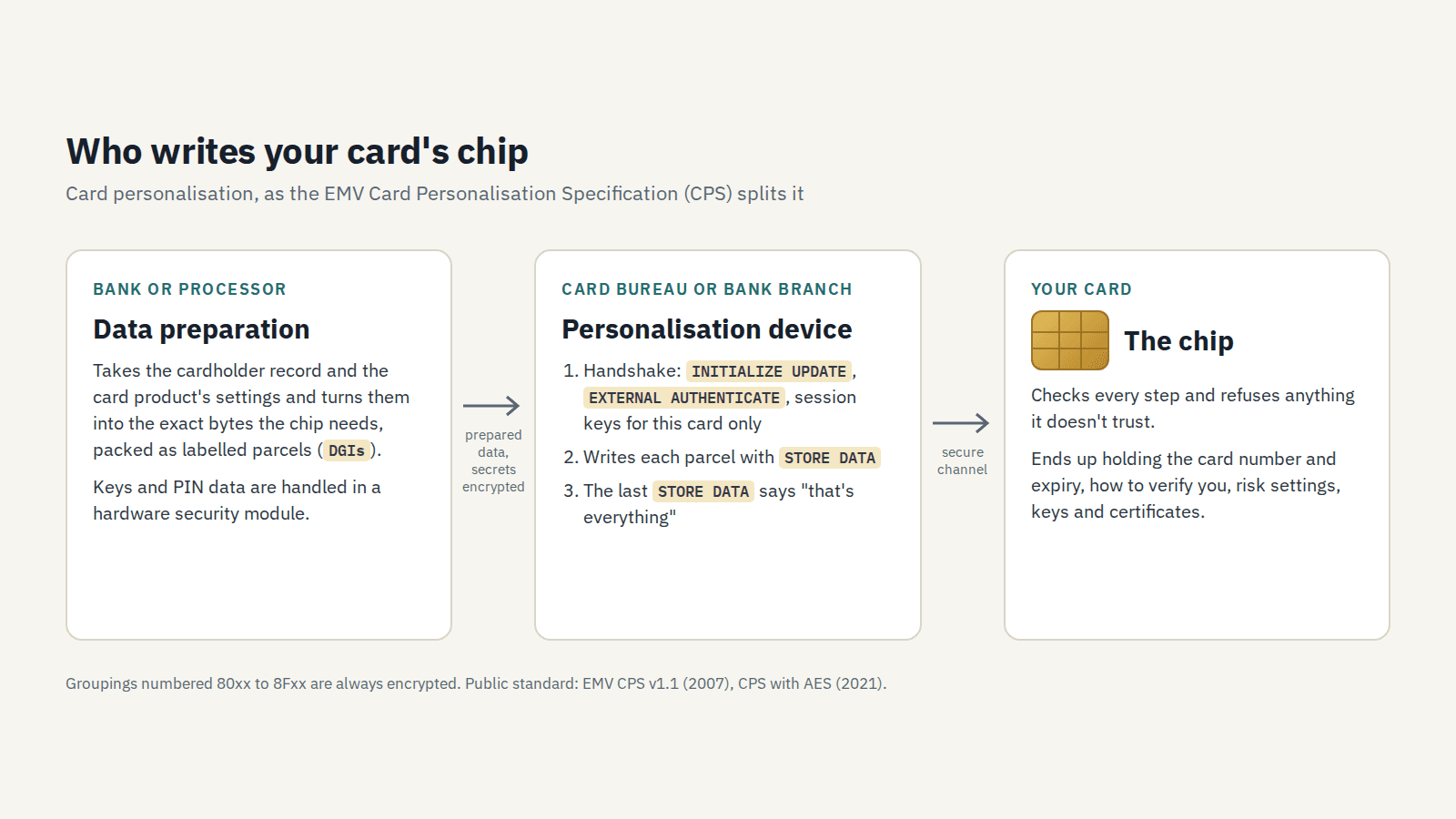
Splitting the work this way matters because the three pieces usually come from different companies. A shared standard is what lets a data preparation system from one vendor, a machine from another and a chip from a third work together on the same card.
What actually goes on the chip
It helps to think of the data in three groups.
Everyday data any terminal can read. The card number, expiry date and cardholder name. The ways the card accepts to verify you: PIN, signature, or nothing for small amounts. Country and currency codes. And a set of risk settings that tell the card when it can approve on its own, when it must ask the bank, and when to decline.
Secrets. The keys the card uses to prove to the bank, on every transaction, that it's genuine. And your PIN. Nobody should ever see these, the bureau included.
Certificates. These let a terminal check that the card is genuine without calling anyone. They deserve a post of their own, so I'll come back to them.
CPS packs all of this into labelled parcels called data groupings. Each one has a two-byte number, its DGI, that tells the chip what's inside and where it goes. One rule I like for its bluntness: any grouping numbered from 80xx to 8Fxx is always encrypted. If one ever see one in the clear, something has gone wrong.
The handshake before anything is written
The chip won't take data from just any machine. Before a single byte is written, the personalisation device and the chip run a short handshake, using two commands called INITIALIZE UPDATE and EXTERNAL AUTHENTICATE. Each side proves it holds keys derived from the same master key (CPS calls it the KMC), and together they work out fresh session keys for this card and this session only.
Everything after that travels under those session keys. Secrets are re-encrypted for this one card. Someone who recorded the whole exchange would end up with nothing they could use on the next card, or on any other.
Then the data goes in, one grouping at a time, with a command called STORE DATA. The last STORE DATA carries a flag that says "that's everything", and the card treats its setup as done.
Why mistakes here hide so well
This part is my own view, not something from the standard.
A wrongly personalised card doesn't look broken. It powers up, answers the terminal, and most of the time it pays without a problem. The mistakes only show up in particular situations:
- A risk setting with one wrong bit can make a card decline every time it meets a terminal that works offline, like the ones on buses or flights, while it works perfectly at every shop counter.
- A certificate built for the wrong key fails the offline check that most terminals run on every payment, even the ones that go to the bank. But the terminal only flags the failure and passes it on. If the bank approves anyway, the payment goes through and nobody notices, until the card meets a terminal that can't reach the bank and has to decline.
- A certificate expiry date nobody was tracking can quietly break offline checks for a whole batch of cards, on a date months away.
- A country code that doesn't match the issuer changes how terminals abroad treat the card.
None of these show up in a quick test at the bureau. They show up as complaints weeks or months later, often after tens of thousands of cards are already in people's wallets. By then the fix is a reissue.
So the cheapest moment to catch a personalisation problem is before the first card is made, by checking the prepared data against the specifications themselves. Comparing it with last year's batch only tells you it matches last year's mistakes.
Where this series goes next
Over the coming weeks I'll keep going in plain language: the keys and certificates that let a terminal trust a card offline, what happens in the half-second of a tap, and how card issuing is changing.
If you work at a bank, a bureau or a fintech that issues cards, tell me which part you'd like explained next. And if you think I've oversimplified something, please say so. That's how these get better.